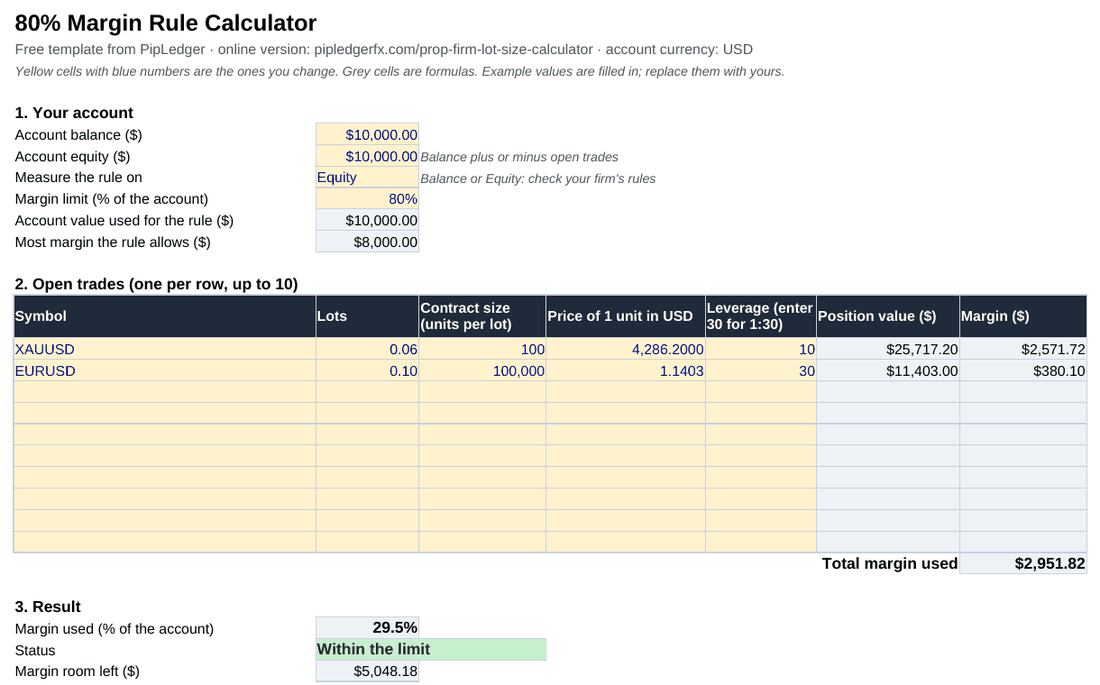
What's in the template
- Your account: balance, equity, whether your firm measures the rule on balance or equity, and the limit, 80% by default.
- Open trades: up to 10 rows. For each trade, type the lots, the contract size, the price of one unit in US dollars and your leverage on that symbol. The sheet works out the position value and the margin.
- Result: margin used as a percentage of the account, a clear Within the limit or OVER THE LIMIT, and how much margin room is left.
- Next trade: the most lots you can add without going over, and a smaller size that keeps you at 70% (or 10 points under a lower limit) so a price move doesn't push you over.
Every result cell is a formula you can inspect. Yellow cells are the ones you change.
The formulas it uses
Position value = Lots × Contract size × Price of 1 unit in USD
Margin = Position value ÷ Leverage
Margin used % = Total margin of open trades ÷ Balance (or Equity)
The "price of 1 unit in USD" column is what makes it work for every instrument. For EURUSD it's the EURUSD price. For USDJPY it's 1, because the first currency is already the dollar. For gold it's the gold price, and for EURJPY it's the EURUSD price. The template has a table of these on the sheet.
Worked example from the template
The file opens with two example trades on a $10,000 account, with the rule measured on equity and an 80% limit, so $8,000 of margin is allowed:
| Trade | Position value | Leverage | Margin |
|---|---|---|---|
| XAUUSD 0.06 lots at 4,286.20 | $25,717.20 | 1:10 | $2,571.72 |
| EURUSD 0.10 lots at 1.1403 | $11,403 | 1:30 | $380.10 |
| Total | $2,951.82 |
That's 29.5% of the account, within the limit, with $5,048.18 of margin room left. One more lot of gold at 1:10 needs $42,862 of margin, so the most you can add is 0.11 lots, or 0.09 lots if you want to stay at 70%.
How to open it in Google Sheets
- Download the file.
- In Google Sheets, choose File → Import → Upload and pick the file, or drag it into Google Drive and open it with Google Sheets.
- Make a copy for each account you trade, so the open-trades table stays separate.
Template or online calculator?
The template is handy for planning and record-keeping, and it works offline. The online 80% margin rule calculator fetches live gold, silver and currency prices, checks your daily loss limit as well, and needs no typing of prices for those. Many traders use the online one before a trade and the sheet to keep a log.
Which prop firms have a margin rule?
Only a few firms publish a margin percentage, and they word it differently. Goat Funded Trader counts any trade idea that uses more than 80% of available margin as gambling-style trading, and Blue Guardian has an 80% rule as well. Others cap the risk per trade or the lot size instead. The GFT margin rule calculator has the details and a comparison table, and what happens at 80% margin usage explains why the limit matters.